Finding Your Giving Information
The number one question we have been getting is related to finding giving information. There are a couple of different ways to do this, so let's get started.
1. From the giving page.
Click on Give on the top navigation bar. At the bottom of the donation field, there is a light grey button that says "Log in to your giving account."
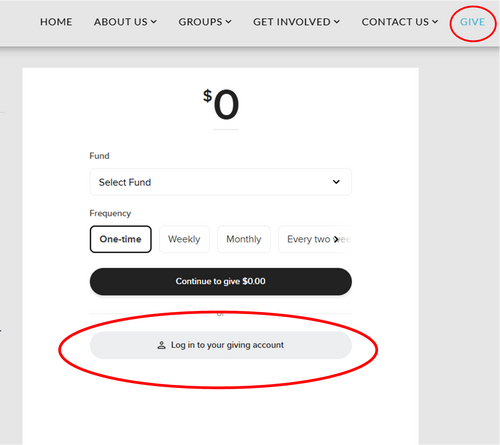
The first time you click on it, you will need to set up a new account. Don't worry, by using your personal email address, the database will automatically recognize your account in the system, and your giving history will all be there. You only need to create your account the first time.
NOTE: Combined household giving is not available. If a donation is missing, check under your spouse's account. Unfortunately, there is nothing we can do to combine the giving into one report as in the past.
NOTE: Combined household giving is not available. If a donation is missing, check under your spouse's account. Unfortunately, there is nothing we can do to combine the giving into one report as in the past.
2. Through the personal web app.
At the very bottom of each webpage, in the footer, there is a link to Access the Personal Web App. That link will take you to a scaled down version of our (future) mobile app. The personal web app will allow you to eventually message your groups, watch sermon content, and access your giving account.

Unless you have already set up your account through the giving page, you will need to do that on the web app page. Once you're logged in, click on the Give tab at the top.
HINT: Explore what the other tabs have to offer! For an added challenge, find the overlapping quotation boxes. This will be where you will eventually be able to see all the groups you are in, and be able to contact groups and individuals directly!
HINT: Explore what the other tabs have to offer! For an added challenge, find the overlapping quotation boxes. This will be where you will eventually be able to see all the groups you are in, and be able to contact groups and individuals directly!
Need more help?
Each user must have a unique email address to connect with their account. The email address from the former database was carried over, so be sure to set up your account using that email address. However, if you shared an email address with your spouse, only one of you will have that email address now. If you have questions about which person the email address was assigned to, please email Sarah.
All of the groups are still in the process of being set up, so you may not see everything you're involved in just yet. Most communication is still being done through our former database, CCB. If you are not receiving any communication, please email Sarah. If you are having trouble creating your account, please email Sarah.
If you feel there is a discrepancy in your giving history, please check your spouse's giving history. If the numbers between both accounts are not adding up correctly, then email Peg.
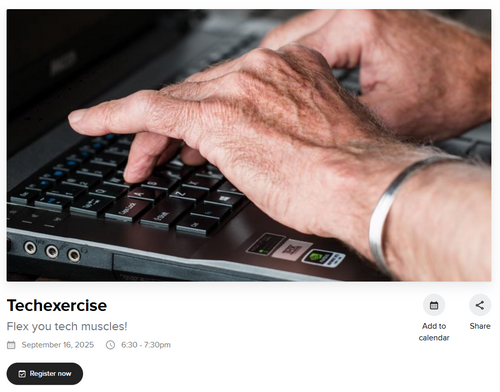
Come to Techexercise on September 16! This event will be focused on navigating the new website and app, and Sarah & Liz will be there to help you get your personal account set up or figured out.
All of the groups are still in the process of being set up, so you may not see everything you're involved in just yet. Most communication is still being done through our former database, CCB. If you are not receiving any communication, please email Sarah. If you are having trouble creating your account, please email Sarah.
If you feel there is a discrepancy in your giving history, please check your spouse's giving history. If the numbers between both accounts are not adding up correctly, then email Peg.
Come to Techexercise on September 16! This event will be focused on navigating the new website and app, and Sarah & Liz will be there to help you get your personal account set up or figured out.
Recent
Archive
Categories
no categories
No Comments